pablin.me

Converger · Maths and physics for iPad

Move the maths,
then check it.

Converger explains advanced maths and physics the way a good teacher does at the whiteboard: one idea at a time, with a picture you can move. Drag a point, slide a parameter, predict what happens, then check your answer and hear about the mistake you actually made.

iPad iPadOS 27 Free One-time Pro

Coming to the App Store

No account, no ads, no tracking, and no servers of ours
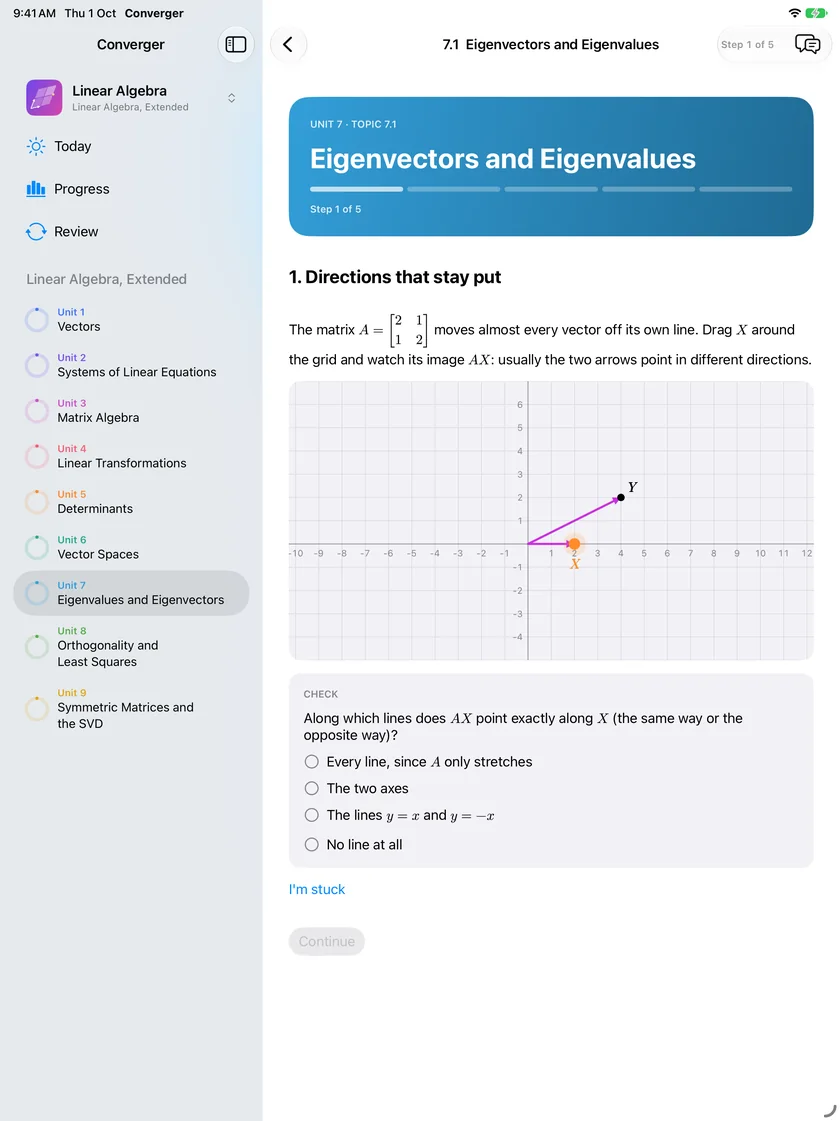
Linear Algebra, Eigenvectors and Eigenvalues: drag X around the grid and watch its image AX, then say along which lines AX points exactly along X
PREDICT, THEN CHECK
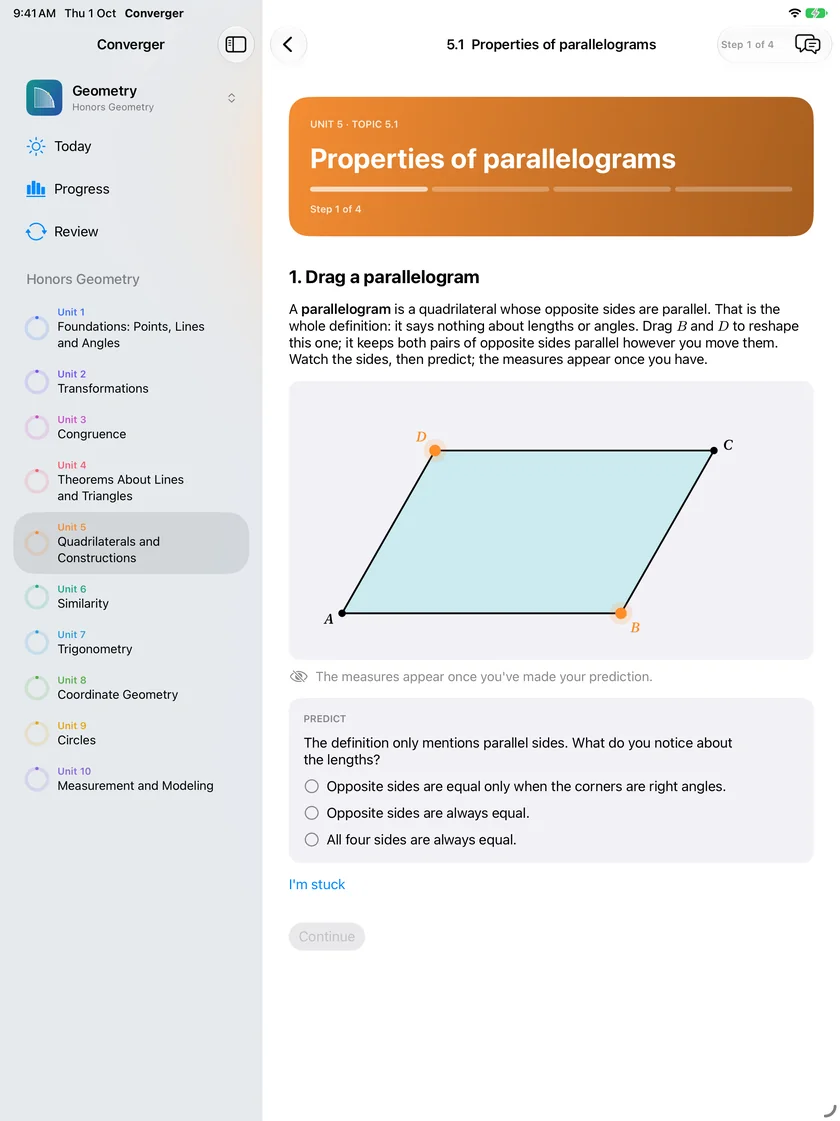
Geometry, Properties of parallelograms: a parallelogram ABCD with B and D to drag, and a prediction about its sides before the measures appear
DRAG, SLIDE AND PREDICT
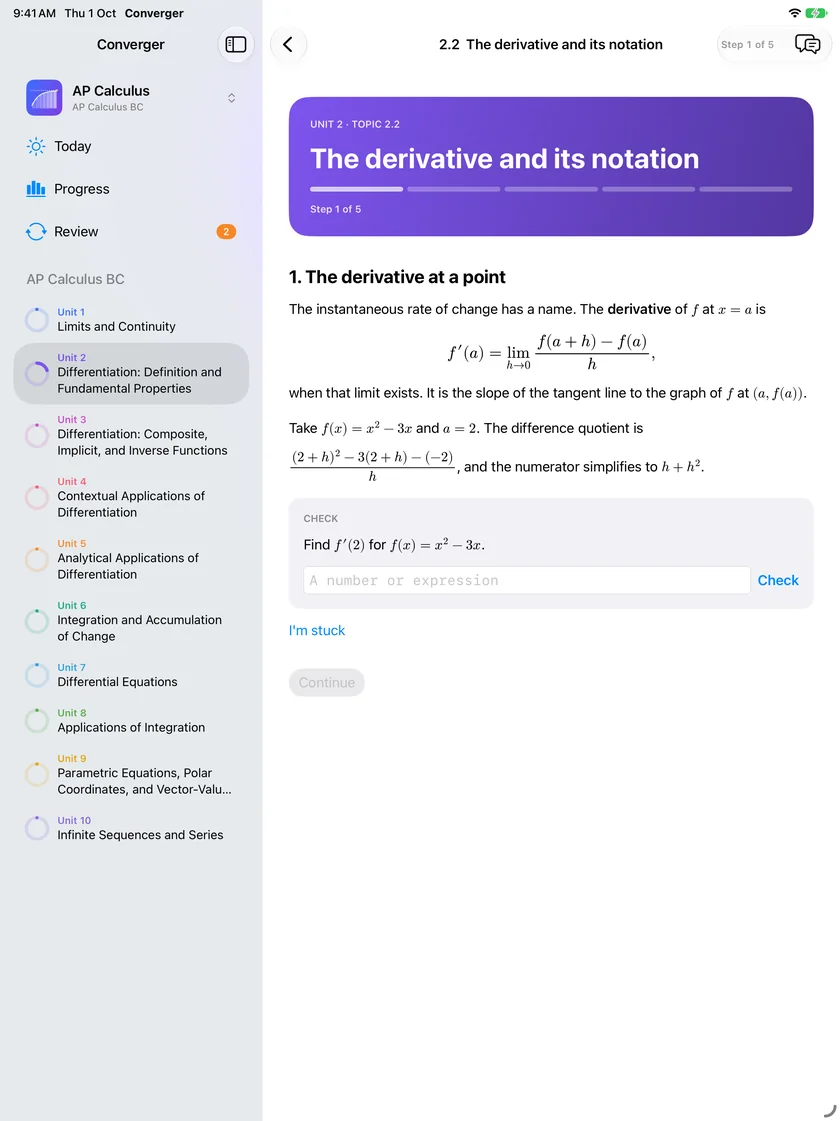
AP Calculus, The derivative and its notation: the definition of the derivative at a point, a worked difference quotient, and a check asking for f prime of 2
AP CALCULUS AB AND BC
4
Subjects in version 1
300
Lessons, 108 of them free
79
Geometry topics, free in full
0
Accounts, ads or trackers

How a lesson works

The idea first, then the formula

Every lesson is interactive. You move something and watch the idea happen before the definition arrives, and the definition points back at what you just saw.

I

Move it

Drag a vertex and everything built from it follows, with the measures that stay true. Slide a parameter and the graph responds. Drag the columns of a matrix and the whole grid goes with them.

II

Predict, then check

Before a lesson shows the answer, it asks for your guess. The measures and the curve appear once you have committed, so you find out what you actually expected.

III

Feedback on your mistake

A wrong answer gets the reason it is wrong, not just a red mark: the step you skipped or the rule you mixed up. Any equivalent form of a right answer counts.

IV

Practice that changes

Practice problems for every topic, with new numbers every time, so you never run out and never learn the answers by heart.

V

Spaced review

Each topic you finish comes back for review before you forget it. Today shows what is next, what is due for review, and a fact of the day.

VI

A scratch pad for Pencil

Every problem has a scratch pad for Apple Pencil, for the working you would otherwise do on paper beside the iPad.

VII

Proofs, one step at a time

A proof is built line by line: you pick each statement's reason from the ones that could justify it, and the lesson tells you when a step does not follow.

VIII

Hints on every step

Every question in every lesson carries written hints, from a nudge to one worked step, so being stuck never ends the lesson.

The subjects

High school to university, maths and physics

Version 1 has four subjects and 300 lessons. Each is the whole course, in order, with a further track for students who want more: Honors in Geometry, BC in calculus, Extended in physics and linear algebra.

I

Geometry

Honors high school geometry, free in full: 79 topics from points and angles through transformations, congruence and proof, similarity, trigonometry and circles to volume. Figures you drag, and solids you turn with a cross-section that slides through them.

II

AP Calculus AB and BC

Limits through series, the full course framework in 111 topics. Drag a secant until it becomes the tangent, slide the number of rectangles under a curve, raise the degree of a Taylor polynomial and watch the error shrink.

III

AP Physics 1

Kinematics through fluids in 53 topics. A play button and a time slider run the projectile, the orbit and the spring, and each law arrives after you have moved something and predicted what it does.

IV

Linear Algebra

Vectors through eigenvalues and the SVD, matrix first, in 57 topics. The determinant is the area of a cell you can stretch, and an eigenvector is where a vector and its image line up.

More subjects are on the way: AP Physics 2, multivariable calculus, differential equations, probability and statistics, and more. Each arrives in an update once a person has read it through.

Made for iPad

A plan for every day

The subjects and their units sit in the sidebar, and the lesson takes the rest of the screen. Today opens on what is next, what to review, and a fact of the day. Light and dark follow your iPad.

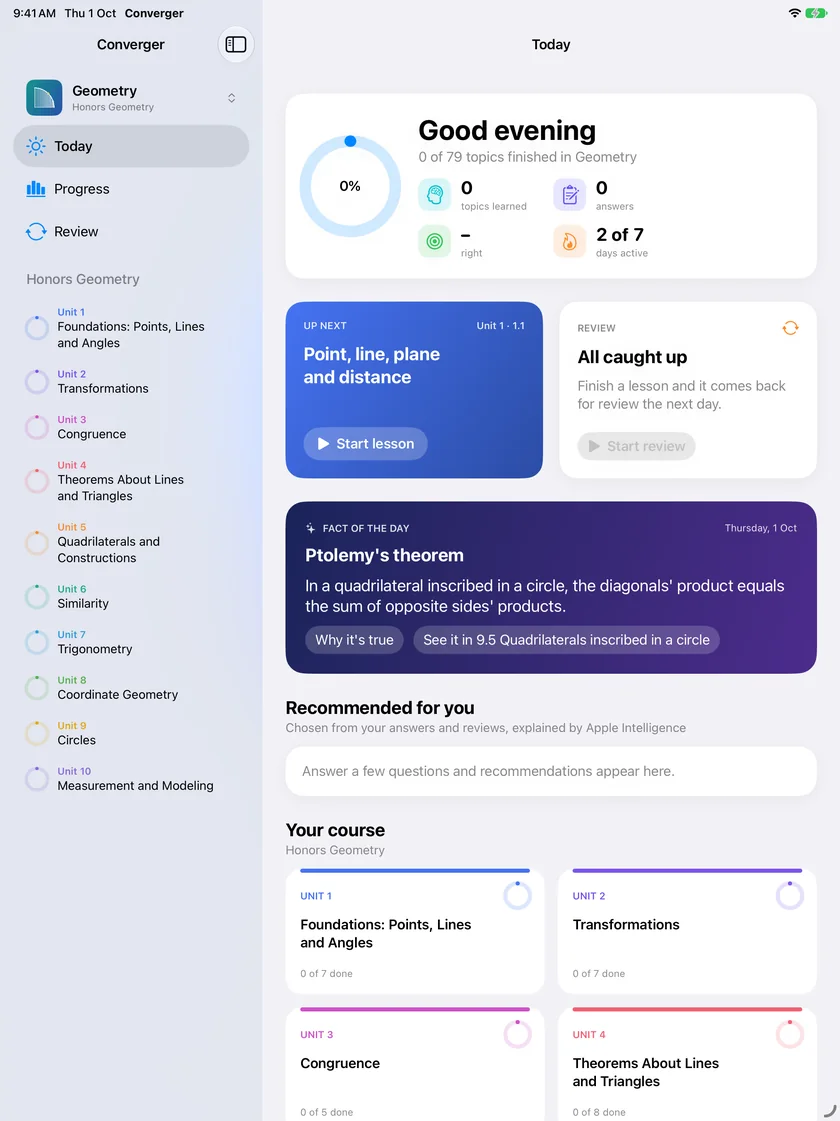
Today in Geometry: progress for the course, the next lesson, review all caught up, a fact of the day about Ptolemy's theorem, and the course's units
TODAY
A Linear Algebra lesson with the units of the course in the sidebar and the lesson beside them
THE COURSE BESIDE THE LESSON

The companion

Help at the step you are on

Ask the companion and it answers about the exact step in front of you: the line of the lesson, the state of the graph, what you have tried. It runs on your iPad with Apple Intelligence, so your questions go nowhere else.

It gives a nudge first, then a hint, then one worked step, and never the practice answer before you have tried. The model explains; the app checks every number it states against its own maths engine before you see it. On an iPad without Apple Intelligence, every step still has its written hints, and no lesson depends on the companion.

Converger Pro

Geometry is free in full. Pro is one purchase, for every subject.

Converger Pro is a one-time purchase, US$19.99 in the US (other storefronts are priced by Apple). No subscription. It works with Family Sharing, and every subject added later joins Pro at no extra cost.

I

Free

Geometry, the whole course. The first unit of every other subject. The fact of the day, daily review of what you have learned, the companion and the scratch pad. 108 lessons in all.

II

Pro

Every unit of every subject, every track included, with its practice and review: 192 more lessons in version 1, and every subject that comes after, included.

Converger

Interactive maths and physics for iPad. Free, with Converger Pro as one optional purchase.

Coming to the App Store

iPad · iPadOS 27 or later

AP® and Advanced Placement® are trademarks registered by the College Board, which is not affiliated with, and does not endorse, this app.