← pablin.me

For coaches, riders and parents

Shoot it.
Step through every frame.

The pop happens in a tenth of a second and the phone's player skips straight past it. Open the clip you just shot, step to the frame where it went right or wrong, draw on it, measure it, and send it back slowed down with the drawings in.

iPhone & iPad iOS 26 Free, then one $19.99 purchase

Download on the App Store

No accounts, no subscription, and nothing leaves your phone unless you send it
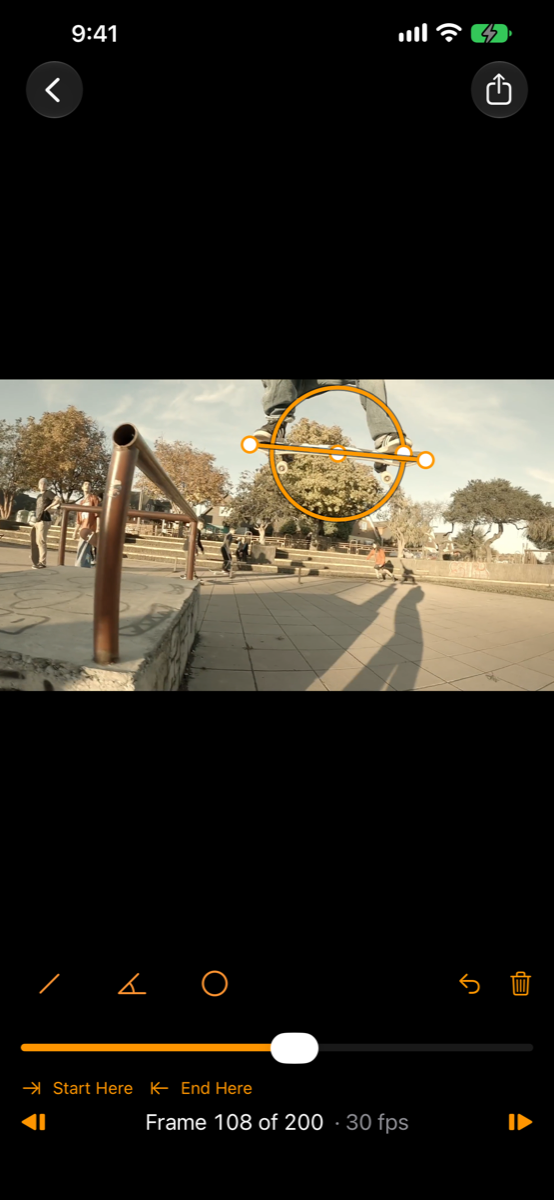
Replay Breakdown on an iPhone: a skateboarder at the pop, with an angle drawn from the tail along the board reading 53 degrees
FRAME 58 OF 200 · THE POP · 53°

What it does

From the clip to the answer in seconds

Every frame, not the playback copy

A slow-motion clip picked the usual way comes back as a 30 fps render with most of its frames gone. Replay Breakdown opens the original file, so a 240 fps clip keeps all 240 frames a second. The newest clip in your library is one tap from the home screen.

Draw and measure

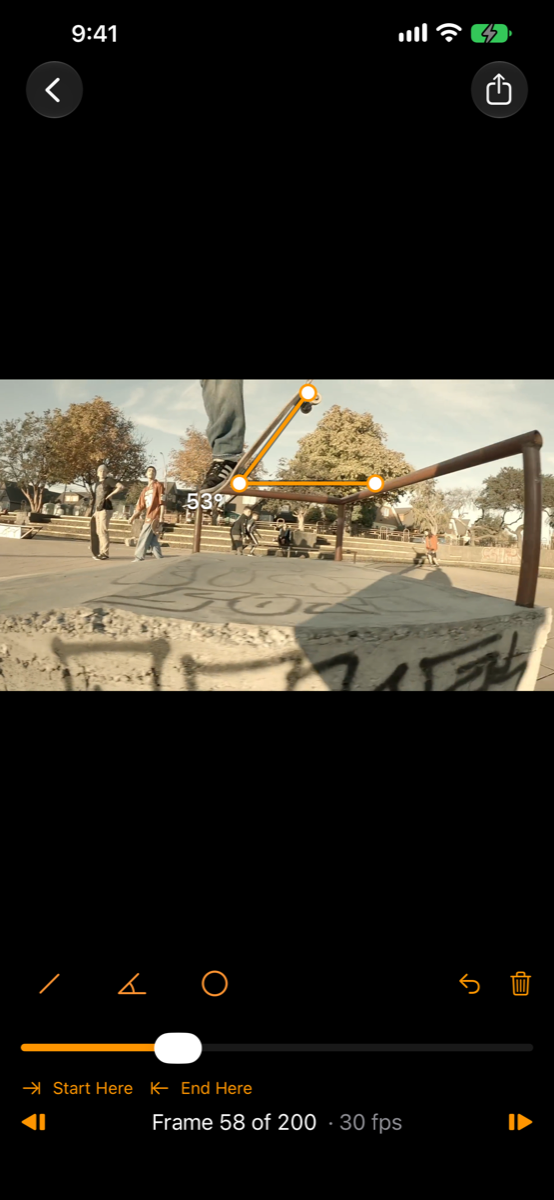
Lines and arrows that snap level and plumb, angles read off the picture as it really is rather than as the screen squashes it, circles, a freehand pen, and an airtime timer that counts up from take-off to landing and holds the total. Five colours, and each drawing shows for one frame, half a second, or the rest of the clip.

Side by side

Put two clips on the same moment — the pop, the take-off — and link them there. From then on they move together, frame by frame, each at its own frame rate, side by side or one laid over the other. Last week's attempt against today's, or the student against the pro.

Talk it through

Press the microphone and talk while you scrub, draw and zoom, the way you'd explain it standing next to them. Play it back to check it, then send it as one video: your voice over every frame you stepped to and every line you drew, in step.

Send it back

Trim to the move, then export at real speed, half speed or quarter speed as an MP4 that plays in any messenger, with the drawings and the timer painted in. Or save the one frame that says it all as a full-size picture.

On iPad, with Apple Pencil

The Pencil draws while your fingers scrub and zoom. Double-tap or squeeze for the tool you used before. Open two clips in two windows with Stage Manager.

Every frame

Built around the frame, not the timeline

Frame numbers come from the file's own timestamps, never from a nominal frame rate, so a measurement lands on the frame you meant and stays there. Frames around the playhead are decoded ahead, so dragging through a clip keeps up with your finger, and zooming in sharpens to the file's full resolution when you stop.

Drawings are kept with the clip on your phone, so they're there the next time you open it. Exports read the original at full size and put every frame of a slow-motion clip on the timeline at quarter speed.

The board over the rail at frame 108, with a circle around it and a level line along it
FRAME 108 · LEVEL OVER THE RAIL

Price

Free, and then one payment

Everything is free at full quality, with no limit on clips or frames: every tool, the timer, stills, video exports at every speed, comparing two clips on screen, and recording a voiceover and playing it back. Videos from the free version carry a small Replay Breakdown mark in the corner.

$19.99 takes the mark off, and exports comparisons and voiceovers as one video. One payment, shared with your family. No subscription, no account, no sign-up, and not a timed trial.